Hotbox Shenaningans
I gave the Fediverse a thermal printer on my desk. Here’s what I’ve learned from that.
Why would you do that?!
Since I work as an IT apprentice at a big retailer, I regularly come into contact with Point of Sale hardware, which is a fascinating world on its own. Scanners, displays, special interfaces, and thermal printers were my daily bread and butter back when I was working in that department. I eventually left that team, but my fascination stayed. I have some hardware lying around from a scrubbed project, which includes a thermal printer. And since people say that I tend to have masochistic tendencies, I wanted to see how much bullshit the Internet could do with it. I wanted to aim for the spirit of the (now mostly broken?) website drivemeinsane.com, where visitors could toy around with lights and displays in an office observed by a webcam. My vision wasn’t quite as drastic, but I thought it would be funny if I gave a whole collective of creatures access to a tool that could effectively make me question my own sanity.
The Masterplan
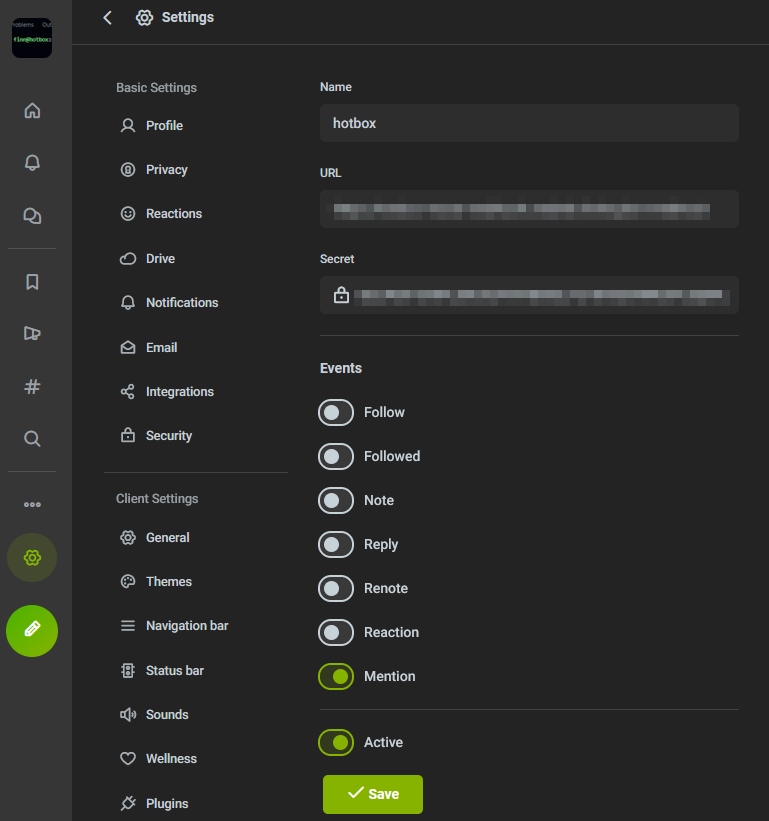
So I took a Raspberry Pi 3 I had lying around as well, flashed a fresh install of Raspberry Pi OS Lite 64bit on an SD card, and got to work. My weapon of choice is, as always, Node.js. I am well aware that some see JavaScript as a toy language and Node as a failure in itself, but it’s the best I could do since I didn’t write any code in the past months. It’s what I’m familiar with, and I’m simply too stupid for Rust or other alternatives. Besides, JavaScript’s syntax is quite easy to understand, which makes it easier for me to explain what I came up with. But it isn’t just the printer I have to set up. There’s also the question of how to receive content to print out. This was a bit easier. I have an Iceshrimp instance running on my infrastructure, which allows me to play around with APIs however I see fit. I created a new account and set up a webhook that fires every time that account is mentioned, then created an API key, so the account can reply to the mentioned posts. Cool, but where does the webhook point to?
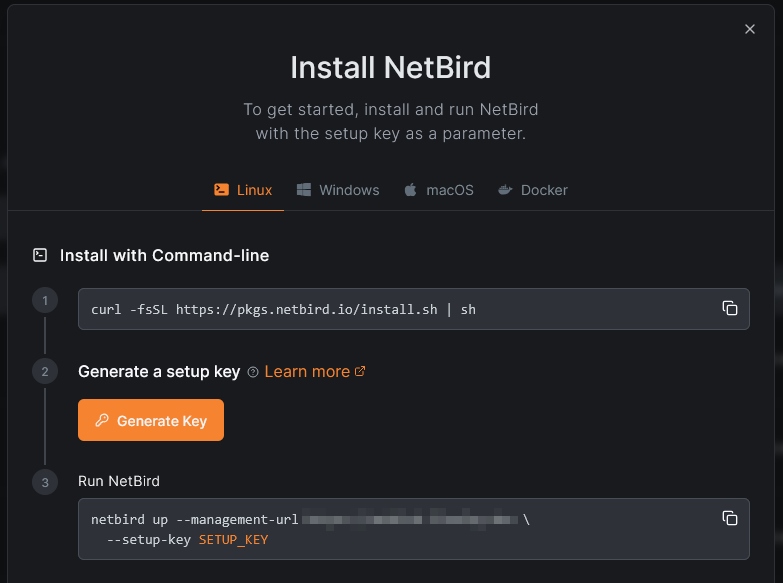
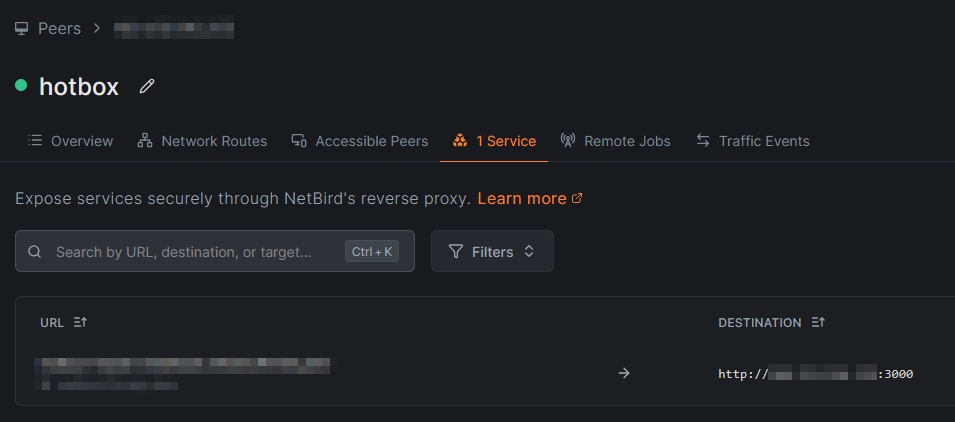
Of course I could have used DynDNS with some fancy reverse proxy, but I thought that the effort of setting that up was disproportionate to the project scope, so I used existing infrastructure once again. I have a NetBird instance running on a VPS somewhere in Frankfurt. NetBird is a VPN solution that takes WireGuard and slaps things like automatic P2P tunneling and Zero Trust on top of it. It also includes an almost effortless reverse proxy, which I had already configured for another project. Jackpot! Setting up NetBird on that Raspberry Pi is done with two commands, one for installing and one for registering it to my control plane. This setup also gives me a ton of flexibility because I can deploy it almost anywhere without having to worry about DynDNS or port forwarding while also having a secure tunnel to my hardware in case stuff goes wrong and I’m not physically there to fix things. At this point, I want to thank DanDanX for introducing me to the dark magic of NetBird.
With the logical infrastructure planned, I started working on connecting the thermal printer to my RPi. It technically supports Ethernet, but using that would introduce another variable out of my control. So I used the full-size USB Type B port instead. That didn’t work as I expected. The printer was in a weird USB interfacing mode that would have required special software to operate. I could have set up CUPS on the RPi and somehow connected the printer to that, sending print jobs to localhost (note: the manual actually suggested that for Linux!), but that would have wasted more of the limited resources I’m already wasting with Node. Some research later, I found a utility that can set parameters of the printer via special commands. Of course it’s only available for Windows. Luckily enough, my main workstation still runs Windows 10 ESR. I reconfigured the printer to accept ESC/POS commands directly via an emulated serial port, and sure enough, I had a new /dev/ttyACM0 device showing up on my RPi. That would come back to haunt me later, but let’s not worry about that for now (I didn’t either).
Intermezzo: WTF is ESC/POS?
Back when needle printers were a thing, Seiko Epson developed a page description language called ESC/P. Depending on who you ask, the name either stands for “Epson Standard Code for Printers“ or is derived from the description language using escape sequences (hence ESC). At some point, Epson decided to take it up a notch and introduced ESC/POS. POS is short for “point of sale” (no, not piece of shit…) and describes the environment this description language would be used in, for example, around cash registers. This upgrade added escape sequences to operate the cutter on the printer and to open a connected cash drawer. ESC/POS is actually incredibly widespread when it comes to thermal printers. Even my AliExpress plastic box supports it.
A first test drive
I went ahead and implemented the bare minimum: Receive post, extract some text, and print it out. For that, I need to understand the webhook message I receive first.
That’s quite a bit… But it gives us everything we need and a little more, so I quickly threw together a minimum implementation. I’m using node-thermal-printer to interface with the printer (duh), express to host a server for receiving the webhook message, misskey-js for interfacing with my instance, and some other minor boilerplate stuff.
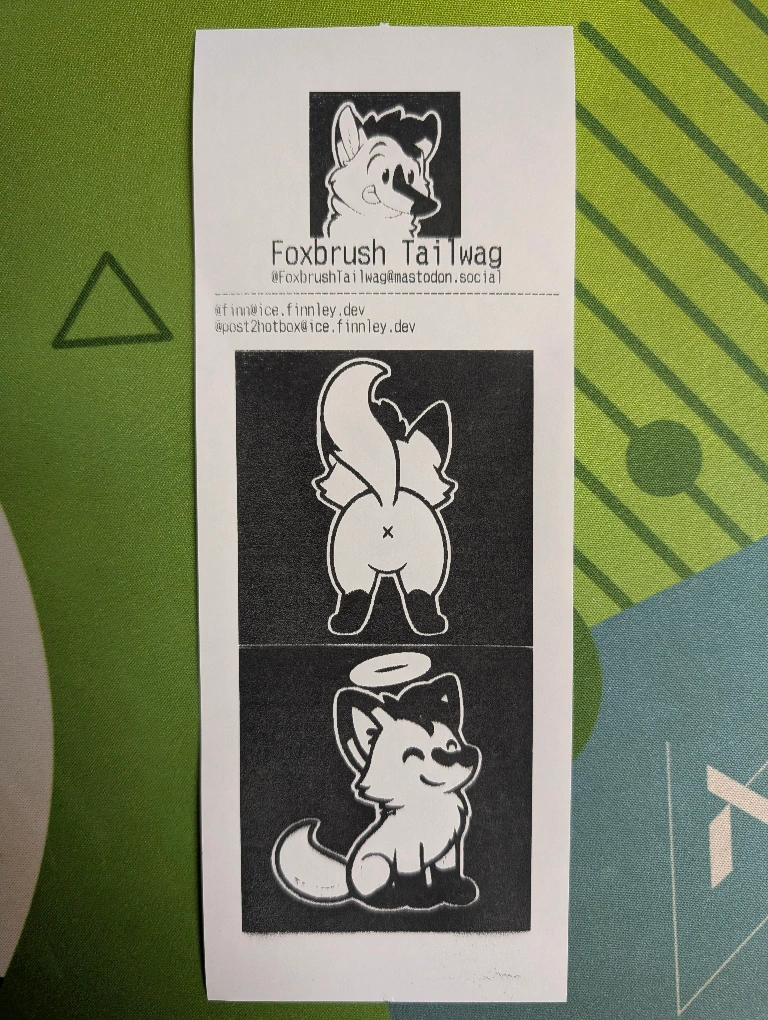
Creatures started testing the boundaries of the code, and it worked quite well. I added image support, downloading attachments with axios and directly sending them to the printer. It looked horrible at the start because the printer only knows black and white and simply thresholds the images however it sees fit. So I scrambled to add a dithering and post-processing algorithm with sharp for the images so they look at least somewhat nicer. Unbeknownst to me, that’s where the problems began.
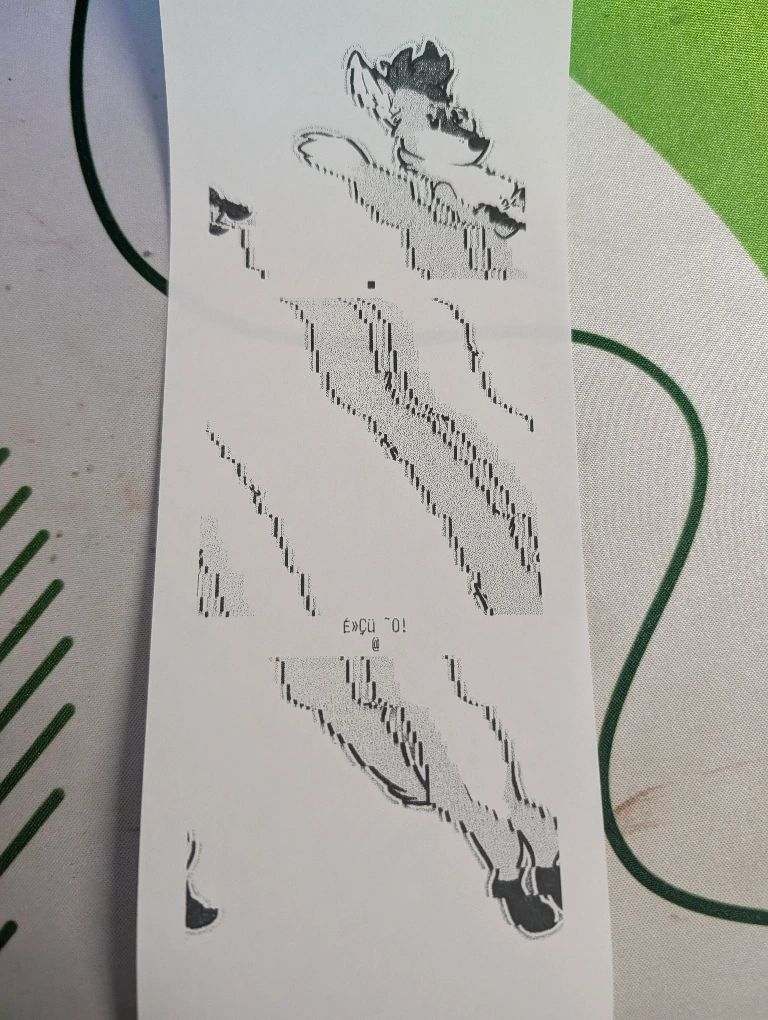
The dithering algorithm caused images to be weirdly distorted. Some images showed staircases where there should be none, others had random characters at the bottom, and others again produced a lot of garbage during the print. First, I suspected that I was processing the images too fast and added a queue system with p-queue. Then I tried saving and then printing the images with printer.printImage() because I thought that pumping the image buffer into the function printer.printImageBuffer() was somehow not memory safe. I also tried fiddling with the print speed and printed test boxes with various widths, checking if there was a problem with the printer in general. All to no avail. I was really confused! The problem started appearing with the dithering algorithm, so I checked if it somehow fucked the images in general. Nope, they came out fine and sharp did a great job at returning valid data. I asked friends if they had ideas. Then, running out of options and being tired, I looked into low-level serial handling… and facepalmed really hard.
Intermezzo: Gradients with one and zero
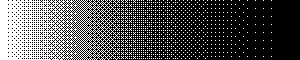
Before diving into my analysis of why and how my printer failed to output dithered images, I want to explain what dithering is in the first place and why someone would want to use dithered images. Look at the gradient in figure 6 below. It looks nice, doesn’t it? A smooth fade from white to black with 254 shades of gray. The problem is that the printer just knows two values: 1 and 0, black and white, dot and no dot. So it would threshold those shades down into two blocks like in figure 7. Everything above 50% brightness becomes white, everything below becomes black.


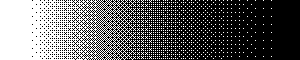
With dithering, I’m essentially applying noise to this gradient in a very controlled way. I chose Bayer dithering in this example since it’s a regular pattern and easier to explain. Also, I had it on hand with GIMP. Each pixel is compared against a threshold that varies by position, taken from a small repeating matrix, which is the Bayer matrix in this case. In a dark area, only the pixels with the lowest thresholds stay white, so you get a few sparse white dots. In a mid-gray area, about half the pixels are printed. In a light area, only a few are black. Your eye can’t resolve individual dots at normal viewing distance, so it averages them into a perceived gray. Look at figure 8, squint if you want. You almost can’t tell the difference between the original gradient and the dithered one.
Another problem is that dots produced by a thermal printer aren’t perfectly square pixels. Heated dots bleed slightly into their neighbors on the paper, so printed areas look darker than the data says. This can make midtones muddy and even lighter shades come out way too dark. By brightening the source image just a tiny bit, fewer dots get printed so the paper’s output lands closer to the intended tones. That lets you keep distinguishable steps at both the black and white ends.
ShiTTY Fix
Let’s circle back to the issue I had with printing those wonderfully shaded images. Remember when I said that using a virtual serial interface would come back to haunt me later? One thing I didn’t know about the Linux kernel is that it puts serial/TTY ports in “cooked mode”. I’m trying to explain this to the best of my abilities, so please don’t be too hard on me.
Serial devices were originally built for humans typing at a keyboard, so Linux puts in a middleman that reads and rewrites bytes passing through called “line discipline”. This allows the kernel to listen for certain things like you pressing Ctrl+C to kill a program, rewriting a newline sequence from “LF” to “CRLF” for terminals so the cursor returns correctly, and so on. That’s cool and all if someone reading text is at the other end of the serial device. It is, however, not byte-safe. The printer expects raw bytes for raster data, and the line discipline middleman did what it is supposed to do, turning 0x0A (LF, Line Feed) into 0x0D 0x0A (CRLF, Carriage Return and Line Feed). The problem is that raster data created from images can indeed contain bytes like 0x0A, so line discipline added bytes where they didn’t belong. The printer is counting bytes to know where each row of the raster data ends, so each insertion moves everything after it by one byte, which is eight dots. This accumulates, the image looks sheared, and leftover bytes are printed as text because the printer doesn’t know how else to handle them. (I tried to visualize this with Excel in figure 10.) The fix for that is setting the serial port into raw mode.
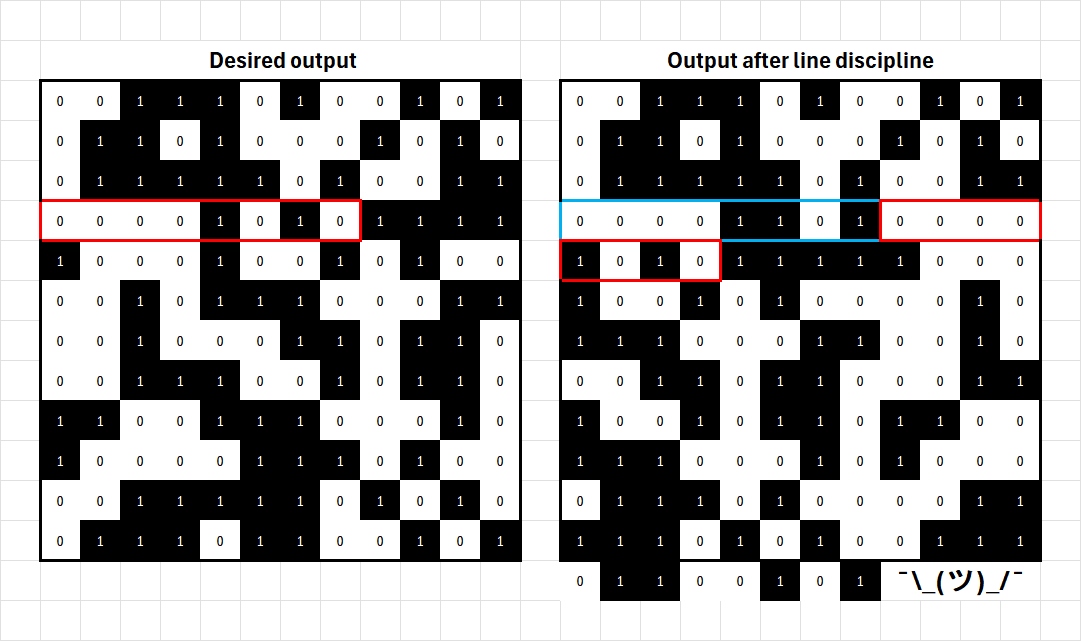
That sounds really complex if you’re new to this concept, so let me try to explain it with this analogy: Cooked mode is like a mail room opening every letter you want to send, correcting spelling mistakes, adding a standardized header, and sending it out for you. That works great for text only! But imagine you’re sending a coded message where every character matters. The mail room giving it the “modify and send” treatment would make the message unreadable for the receiver. That’s essentially what happened with my printer. By putting the serial port into raw mode, I’m telling the mail room to keep my letters sealed and untouched.
It’s a laughably easy fix if you know this. I was in fact so surprised (and angry for not finding this out sooner) that I named it “the ShiTTY fix" after the utility stty. A one-liner into the terminal tells Linux to not touch my precious data:
This causes the port to get the -opost flag, which disables the line discipline middleman completely. After that long explanation, I think nobody should be surprised that this worked flawlessly and Foxbrush’s long fox came out straight this time (*giggle*).
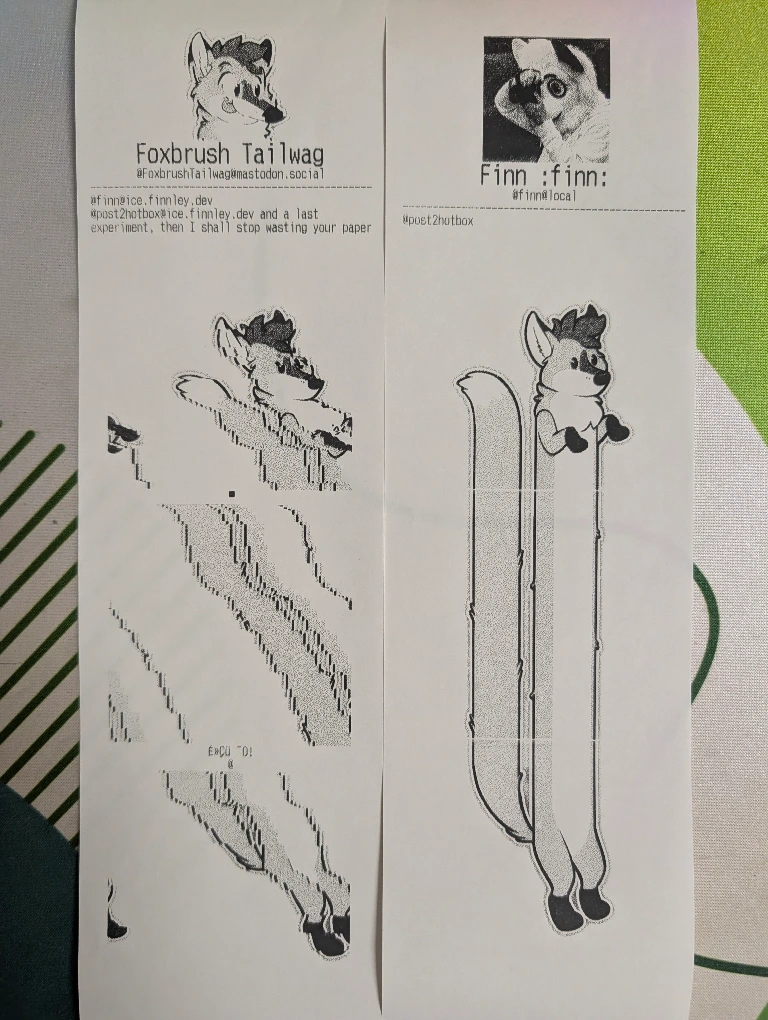
With that out of the way, I’m actually done! The pipeline works and produces nice images. You can find some of the (broken and less broken) results in this thread: https://ice.finnley.dev/notes/asrepxrdd3vrckol
Closing note, and why I won’t publish the full source (yet)
As I said already, I’m really rusty when it comes to development. Burnout has forced me out of that hobby for more than a year. I did not use generative AI for any code except in one place where I tried (and failed) to implement the Atkinson dithering method. Saying that the code is messy would be an euphemism. It does the job but could be way more efficient and structured. I don’t want to be scrutinized or even ridiculed by the FOSS community, which (IMHO!!!) lost its way of co-op development, going for a PvP approach instead. I’m sick and tired of that, and my mental health can’t take that hit at the moment. I will publish the full source code eventually once I have the chance of cleaning it up.
This little project was purely for fun. I had fun doing it and learned some stuff. I’m happy that the creatures out there had fun sending me images and texts (one included the first few paragraphs of Moby-Dick). The bot and the printer will stay online for the near future. You can still send stuff to it by tagging @post2hotbox@ice.finnley.dev and I will reply with the results. Also, it’s nice publishing something on my blog after what feels like an eternity. I really hope that I can do this much more often in the future.
Oh, and if you’re wondering after all that why I called that project “hotbox”: Thermal printers use heat as the name suggests, and my printer is just an ugly black box. I should have put this at the beginning, heh…
Play nice and pay attention if Linux cooks your serial port.
Finnley
Thanks to Steffo and Violet for proofreading this nonsense and HUGE THANKS to Foxbrush for letting me use his and Nik Raccon’s artwork for this blog post. You can find credits and usage conditions here: https://stickers.tailwag.ch/